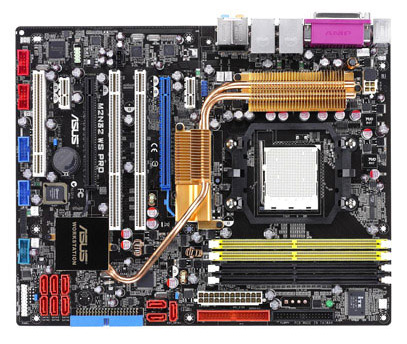
ASUS M2N32 WS Motherboard Pro is a high performance motherboard Professional Series.
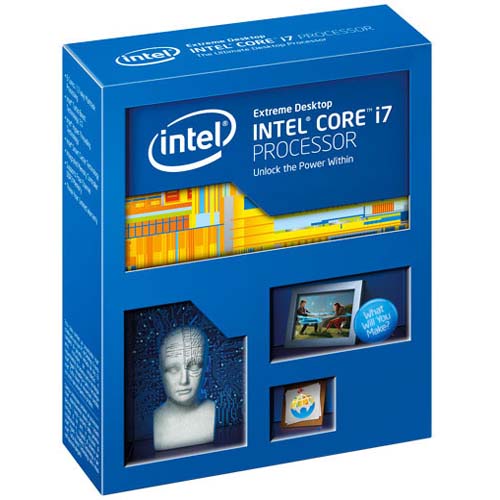
Well, we're setting up our computer and we have chosen the processor you want to mount (see tutorial What is better AMD or INTEL?).
Once seen if we are to engineer a INTEL (socket 755) and AMD (AM2 socket) computer's time to see who will put motherboard.
As you can see, AMD I have not put the socket 939. This is because it is a socket destined to disappear, because on one side only supports DDR (which ever sold less) and partly because AMD and only has a few processors to this type of socket, replacing the models has gradually socket by AM2, DDR2 bearing and also have a significantly lower consumption.
All motherboard manufacturers (with the exception of Intel, which only manufactures motherboards for Intel processors) have plates for both processors and unless the characteristics of each type of processor (Intel or AMD) features are plates that provide the same benefits and grades for both processors. By saying this I mean, for example, we will not find a plate that supports Intel HyperTransport, as this technology is unique to AMD processors.
At this point we should clarify one very important thing. As we say in Spain, nobody gives a free lunch. By this I mean that a plate of high performance, good quality and cheap does not exist. True, there may be price differences between one brand and another, but equal quality facilities and these differences are always going to be small. If for example we have seen a plate with certain characteristics and performance of a X manufacturer for 200 euros, we can find a motherboard with the same quality, performance and features in other manufacturer for 190 or 185, but not 150 or 125.
The quality of a motherboard does not depend on their performance. Depends on the quality of its components and that the services offered are not picks, but constant.
There are a number of items to a minimum required current motherboard must incorporate. Let's see some of them:
- Supported Processors.
Within its range (socket type) must support all available processors.
- Memory.
The most common is that support DDR2 (although there are some plates DDR socket 775 (Intel) and Socket 939 (AMD)).
Must be at least 4 slots for memory, with a minimum total capacity of 4Gb Dual Channel and support, as well as frequencies of 533, 667 and 800Mhz.
There are some low cost boards only have two slots, supporting only 2Gb of RAM.
- 100mbps network card.
Today all motherboards incorporate this element. In high-end motherboards usually include 2 cards, one being the type 100/1000.
- Expansion slots.
The minimum requirement is the following:
16x PCIe slot 1 (for graph, even in the case of plates with built-in graphic).
2 PCIe 1x.
2 PCI 2.2 slots.
- Front Side Bus
Must support a FSB of 1066 in the case of INTEL and 2000 for AMD.
- SATA2 connectors.
At least 4 SATA2 connectors. In the middle and upper ranges is normal to have 6 or 8 SATA2 connectors.
- Support for hardware RAID0, RAID1 and JBOD.
In middle and upper plates range must also support RAID 0 +1 and RAID5.
- IDE connectors.
Typically have 2 IDE connectors (IDE1 and IDE2), but there are some plates with 3 IDE connectors (2 for disks, RAID normally, and one exclusively for ATAPI devices) and more and more motherboards only have 1 connector IDE ATA / ATAPI.
- USB 2.0 Ports.
All current plates have a good collection of USB 2.0, external and internal ports. In some cases even up to 10 USB ports.
- Sound card.
Currently all motherboards have built-in sound card, although this may be very different qualities. From plates with basic sound cards (in any case at least 6.1) to plates with medium and high end sound cards with 8.1 HD digital output S / PDIF.
- Internal connector for serial port.
In the case of not having an external COM port must have at least one internal connector for serial port and have their corresponding wafer output.
- Possibility of remote start.
Almost all current motherboards support remote boot (WoL and WoR).
- Cooling the chipset.
It is very important (especially if you're going to ask for a high performance or overclocking will do) that the motherboard has a good cooling system chipset.
With increasing benefits are many motherboards that incorporate cooling rate for these chipsets Pipeline, in some cases supported by fans.
- Power Connectors on motherboard cooling (fans).
All motherboards have several power connectors for fans (CPU_FAN, CHASIS_FAN, POWER_FAN).
The more connectors of this type are best, since through these connectors can control several parameters related to these fans (state, speed ...).
Ability to boot from different devices.
More and more motherboards that support booting from USB.
The plates are usually high-end also have:
- Ports IEEE1394.
Normally one internal and one external.
- External SATA2 connector.
More and more motherboards that have an external SATA2 connector on the rear panel.
WiFi network card.
It is increasingly common for high-end base plates incorporate your connectivity between WiFi cards.
As you can see in this list do not appear parallel ports or external serial ports. That's because of an increasing number plates lacking this type of ports, especially in the high ranges. For most parallel port (and practically only) use is the printer connector, and these are already connected to the USB port and in the case of the serial port are rare devices using this port at present, limited in practice and EPROM burners HyperTerminal link to a given peripheral configuration and very little else. In both cases there are in the market to USB adapters, both serial and parallel port.
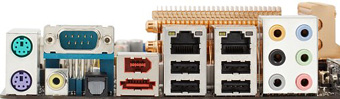
Rear panel view a high-end motherboard. Here are a COM port. We can see the audio output S / PDIF, two RJ45 inputs, 4 USB 2.0 ports, IEEE1394 port and SATA port and 8.1 audio outputs.
To this we must add that each manufacturer can mount a number of specific tools to control this issues like overclocking, BIOS update from Windows, software control temperatures and fans, etc..
One of the determining factors in a motherboard is the chipset it uses. This chipset is it going to take to control the operation and performance of the motherboard, the chipset being used one of the determinants for the price of the motherboard.
The most common chipset quality plates are NVIDIA, INTEL, VIA chipset. Some resort to economic plates SiS or ALi chipset.
On the type of graphical output we can divide motherboards into three groups:
Integrated graphics.
They tend to be economic plates and generally underperforming medium (NOTE, this does not mean that their quality is too low or medium).
This type of plate is ideal when seeking a low-cost computer, which is not going to ask some great graphics performance (edge gaming, CAD / CAM programs, renderings).
Usually Graph 64Mb or 128Mb, using shared memory (the motherboard herein reserves of installed RAM), so the RAM that we must subtract the dedicated to the graph.
If anything should have a PCIe 16x slot to put in any time an independent graphics card.
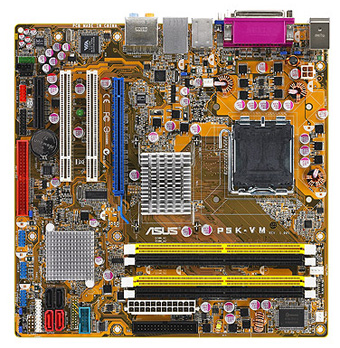
Motherboard ASUS P5K-VM with OnBoard graphics and PCIe slot.
Chart not integrated.
It is the most common type of motherboard. In this group, many motherboards fits, with yields ranging from medium to the highest.
Its greatest feature is that they have only one PCIe 16x slot dedicated for graphics (although they may carry a second PCIe 8x or 16x do not support SLI).
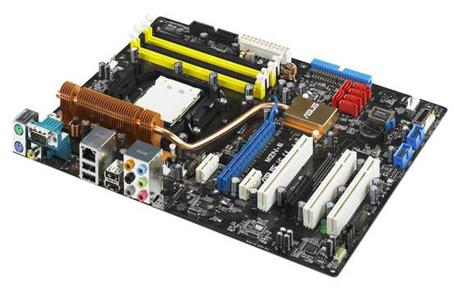
Motherboard ASUS M2N-E. You can see the two PCIe ports, but only blue is for graphics.
SLI or CrossFire Graphics.
The SLI and CrossFire technologies are two multi GPU technologies (developed in the case of Nvidia SLI and CrossFire for ATI), allowing features such as adding the power of two graphics cards in a single output or connect multiple monitors to a computer.
You can see more information about this type of graphs in the tutorial What is SLI and CrossFire system system.
It is in any case high end base plates as the smooth operation of this technology requires high performance.
They are also high-priced motherboards, so it is not recommended purchase if we will not use this technology, especially when you consider that almost all manufacturers have in their range of motherboards prestacionesy same features, but without SLI or CrossFire technology.
The SLI or CrossFire base type plates are recommended for both players requiring maximum performance at the edge gaming to design professionals. Just note that if you use a motherboard of this type with only one graphics card will have absolutely no advantage over a motherboard with identical characteristics, but without support SLI or CrossFire.
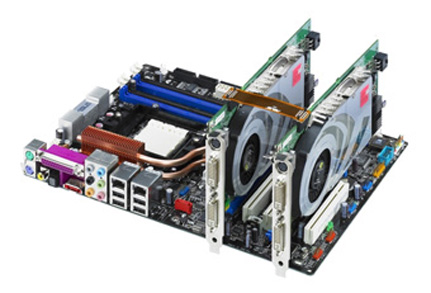
Motherboard ASUS A8N32-SLI two Nvidia SLI mounted.
Are coming to market lately a number of high-end motherboards with specific specifications into two camps:
Plates for Windows Vista.
This is high-end motherboards designed to take full advantage, in both performance and safety, this operating system.
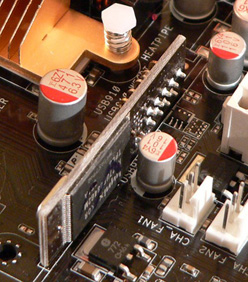
These plates feature a flash memory module dedicated to ReadyBoost and a connection for TPM modules on which to run the BitLocker encryption system hardware.
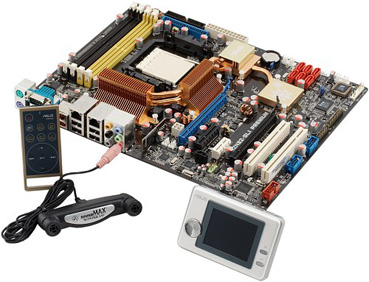
They also tend to bring other extras such as remote controls to control Windows Media Center and even small monitors.
Motherboard ASUS M2N32-SLI Premium Vista Edition with accessories (included with the motherboard). On the right we can see a detail of the Flash card for ReadyBoost.
Plates games.
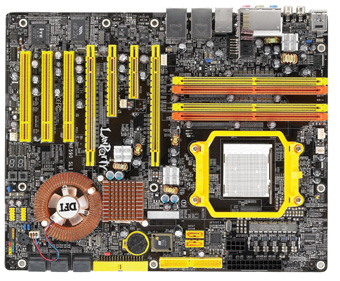
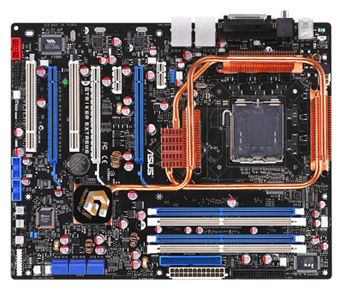
Plates are designed to sacer the most games of last generation. This is high-end specialty plates among which we highlight the series Manufacturer DFI Lanparty UP or ASUS Striker series.
In this type of plates is usually enhanced especially anything related to overclocking and the graphics support, the case in practically all cases of plates SLI or CrossFire.
Pictures of two plates for games. On the left a DFI Lanparti Up and to the right an ASUS Striker Extreme.
Views this is important when deciding on a motherboard or another be clear which is the preferred use we are going to give. Buy us a high-end motherboard for office, Internet and occasionally a game or another is wasting money.
We must also think about the rest of (processor, graphics card and memory) components that let's ride. We must think of the computer as a whole in which the components should be as balanced as possible. Can you imagine a motherboard with high-end Celeron and 512Mb of RAM?. Or a Core 2 Duo E6700 and 4GB of RAM on a plate for 60 euros?.
One issue to bear in mind when choosing our motherboard is its quality, and high quality motherboards cheap simply do not exist. Another thing is they have a better or worse price / quality ratio, but a motherboard (or any other product) has a better price / quality ratio not mean it is better than other more expensive, it just means that their performance it's the best you can buy for that price.
Very important is the support that the brand of motherboard offers. To do this we need to look both support (warranty service) and support the theme of drivers and updates via the Web.
We must also look both compatibility and existing support for the operating system you want to install, whether it is Windows, Linux, OS X or any other.
Grounds so far relates to configure a new computer, but what about when it comes to an upgrade of the motherboard or replacement of this fault?.
For in the latter case we have a keyword: COMPATIBILITY.
By this I mean that the first thing we look for is a motherboard that is as compatible as possible with the rest of the hardware we have, especially to avoid large expenses.
Here we will find a range to choose from much reduced. This range will be smaller the older the equipment we leave, so in many cases we even have to make do with what little they are.
As an example of this, there is currently no production motherboard that supports SDRAM memory and there are fewer that support AGP graphics cards.
This not to mention Intel motherboards for AMD 478 or 754, where the real deal is limited to one or two brands.
One brand that keeps making these motherboards Asrock procesasores is.
This is a brand without being ringside manufactures motherboards with a good quality and a very good quality / price ratio.
Asrock Magenes two plates, a first for AMD 754 and the second for INTEL 478.
In the pictures above we see two Asrock motherboard in both cases these plates OnBoard graphics and DDR memory.
The image on the left corresponds to the model K8NF6P-VSTA (AMD 754), with a PCIe graphics port and on the right is a P4VM800 (INTEL 478), in this case with an AGP port for graphics. The same plate also made port PCIe (P4VM890).





.jpg)
.jpg)
